 Back
Back
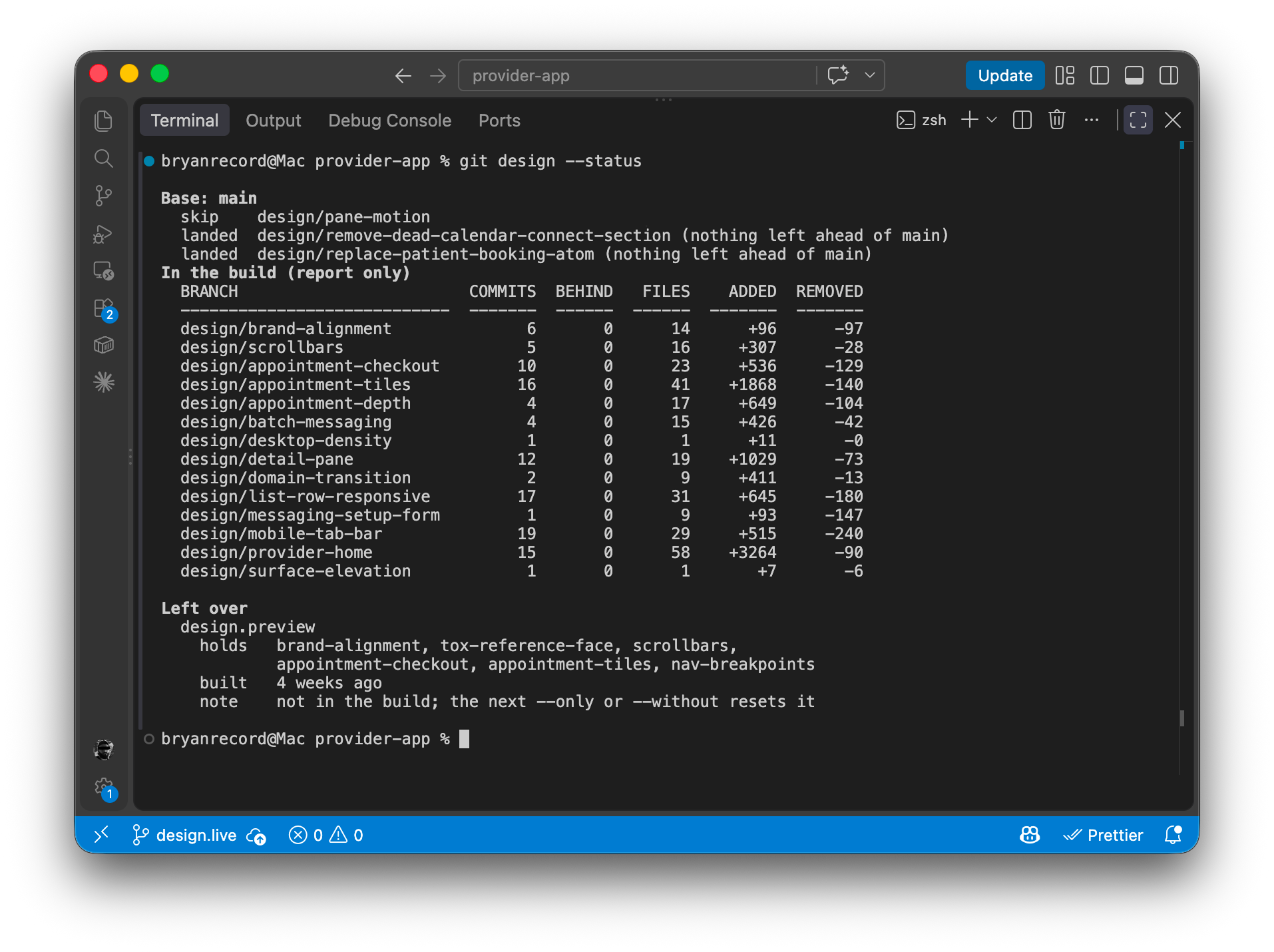
git design.live
I created a simple CLI tool to help mitigate entanglement while designing, iterating, and contributing in code.
AI is Just Another Tool
Over the last four years I have been cautiously interested in machine learning and large language models. I've spent time playing around with early image generation tools, early vibe coding, and running models locally on my own hardware. This last year was different.
For the first time, I found myself utilizing AI professionally. I carefully started experimenting with building out prototypical code for new features while refusing to hand over my critical thinking and problem-solving skills.
The Problem
I have been a hobbyist developer for a few years now. So I combined my personal dabbling in engineering and my professional experience in product design in an attempt to design certain experiences mostly in code. The goal was not to generate designs from scratch, but to direct an agent to build atoms, components, and views as if dictating verbally to Figma.
I quickly discovered a few things:
- Prototypical code for front-end experiences was much more satisfying to explore and play with.
- Shipping front-end components to Storybook for review and discussion increased collaboration and decreased time spent back and forth in design remediation.
- Local feature branches quickly become stale when working with a team, and conflicts can be difficult to manage as a designer.
- One feature branch consumed decisions and components from another. If I wanted to see the parts come together as a whole, I would need to build one large temporary branch each time.
Entanglement
I wanted my feature branches to be clearly defined, not entangled, and independently shippable.
I also wanted to see the changes from all my branches at the same time to ensure these changes worked together well.
Remember, this is an experiment in using VS Code and Claude like a design tool.
The Solution
I gave Claude a very detailed and scoped prompt (in a .md file, of course) to throw together a script that could do this. Then I set an alias in Git to run it like a native command.
git design
The script:
- Fetches main.
- Rebases each local branch to keep them from going stale.
- Compiles an artifact branch including any
design/*branches. - Pauses for the human to resolve any conflicts between branches.
- Records said resolution for automatic resolution next time via
rerere. - Checks out the artifact at
design.livefor review.
The Catch
Like most use cases with AI, the onus of critical thinking, defining scope, and problem-solving is still on the human. I believe outsourcing these human qualities to a program is where most of our angst with AI comes from, but that's a conversation for another day!
I still need to keep branches well-scoped. I'm still creating reusable components and patterns. I'm still responsible for avoiding entanglement and handling conflicts.
But the script allows me to have a local throwaway build that packages the branches I want together into an experience you can explore.
This kind of experimentation is what drives my creativity. I live for the space between defining a problem and resolving it.
"I'm never satisfied with my work. Therefore it's impossible for me to talk about something that I discovered which I was pleased with. Which I'm not. But I am always experimenting, you might say"
The Result
This is a small tool that gives me another surface of exploration. I also think this is a great example of how to use AI ethically and intentionally in our work as designers and UX Engineers.
This little command has increased the quality and efficiency of my contributions (design and code) and made them easier to review and collaborate on.

